
Summary
The Coverage Summary – By Period report compares the number of calls required to adequately cover each account with the number of calls actually completed to date, by coverage target.
It uses the Coverage Definitions configured in Administrator to measure coverage against each account’s assigned call frequency and coverage target. Results can be reviewed by account group (typically Territory) and target frequency, helping identify coverage gaps and assess overall account coverage performance.
Report Location
Report Category: Coverage
Report Sub Category: Summary
Report: Coverage Summary – By Period
Report Sample

Totals & Sub-Totals
Sub Total at the Coverage Target level
Grand Total at the bottom
Parameters \ Filters
Coverage Target
This returns all “Coverage Targets” available in Administrator in “Coverage”
Account Group 1
This filter list will return the "Group Reports On" Account Group for the account in the ‘Account Name’ column. The " Group Reports On" Account Group is defined in Administrator within "Reporting Config".
Account Group 2
This filter list will return the "Extra Group 1" Account Group for the account in the ‘Account Name’ column. The "Extra Group 1" Account Group is defined in Administrator within "Reporting Config".
Account Group 3
This filter list will return the "Extra Group 2" Account Group for the account in the ‘Account Name’ column. The "Extra Group 2" Account Group is defined in Administrator within "Reporting Config".
Account Group 4
This filter list will return the "Extra Group 3" Account Group for the account in the ‘Account Name’ column. The "Extra Group 3" Account Group is defined in Administrator within "Reporting Config".
Field Definitions
Group Name (e.g. Territory)
This column returns the Account Group defined in the “Group By” parameter
Target
This section groups all customers by Coverage Target’s Target Definition. For example:
Filter: Coverage Target = 2026 Coverage Target
This means, all Target Definitions within the selected Coverage Target would appear as a new section:
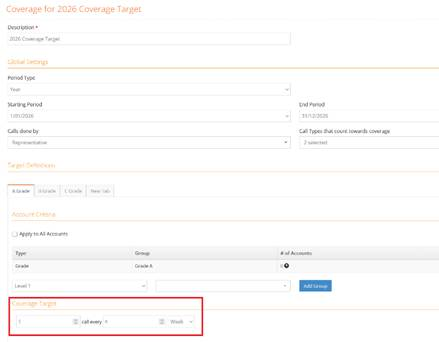
Actual
A count is returned for the number of accounts that have had a Completed Call based on the “Calls done by” and “Call Types that count towards coverage” fields within the Target Definition. For example:
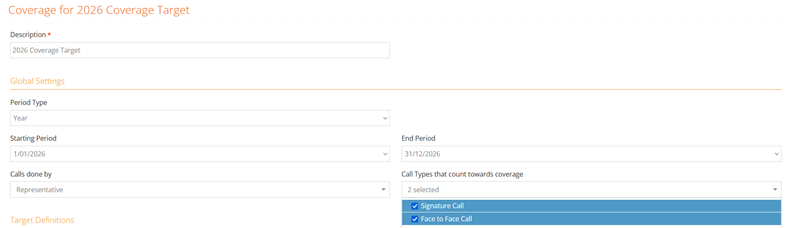
An account would be counted (1) 1/01/2026 IF:
- There is a complete call
- The Call Type is “Signature Call” or “Face To Face Call” (“Call Types that count towards coverage”)
- The Call is done a User of the User Type = “Representative” (“Calls done by)
- The call is between 01/01/2026 and 28/01/2026
In summary, this returns the total count of accounts that have met the required coverage definitions for the selected Coverage Target for that time period.
Target
This returns the total number of required account calls for the selected Coverage Target, based on the number of completed reporting periods to date.
For example:
- The Coverage Definition starts on 1 January.
- Today is 5 February.
- An account is required to be called once every four weeks.
- Two four-week periods have occurred: 1-28 January and 29 January-25 February.
- The Target for that account is therefore 2 - one required call in each four-week period.
If 100 accounts are assigned to this Coverage Target, the total Target would be 200 required calls (100 accounts × 2 completed four-week periods).
Coverage
This is a calculation. The calculation is: Actual / Target (shown as a % to 1 decimal place)