
Summary
This is a summary report that allows a user to report on the number of “Yes” answers to specific Survey Questions
Report Location
Report Category: Store Check
Report Sub Category: Summary
Report: Cycle Questions By Territory
Report Type: Report Viewer embedded
Report Sample
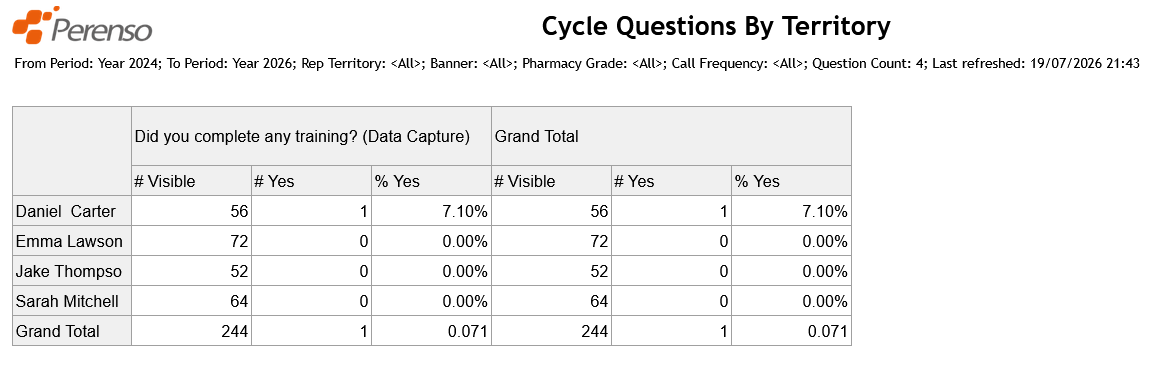
Totals & Sub-Totals
Grand Total as per sample
Parameters \ Filters
- Survey Questions
Allows a user to choose from a list of Survey Questions (multi-select). These are displayed as columns across the top of the report.
- Account Group 1
This filter list will return the "Group Reports On" Account Group for the account in the ‘Account Name’ column. The " Group Reports On" Account Group is defined in Administrator within "Reporting Config". This is a multi select.
- Account Group 2
This filter list will return the "Extra Group 1" Account Group for the account in the ‘Account Name’ column. The "Extra Group 1" Account Group is defined in Administrator within "Reporting Config". This is a multi select.
- Account Group 3
This filter list will return the "Extra Group 2" Account Group for the account in the ‘Account Name’ column. The "Extra Group 2" Account Group is defined in Administrator within "Reporting Config". This is a multi select.
- Account Group 4
This filter list will return the "Extra Group 3" Account Group for the account in the ‘Account Name’ column. The "Extra Group 3" Account Group is defined in Administrator within "Reporting Config". This is a multi select.
Report Notes \ Data Filters
- Only accounts that are active are returned
Sort Order
- “Territory” (A-Z)
Column Definitions
- Territory
This column will return the lowest level of the "Group Reports On" Account Group for the account in the ‘Account Name’ column. The " Group Reports On" Account Group is defined in Administrator within "Reporting Config".
- # Visible
This is the total number of unique accounts the Survey Question is visible to based on the “Accounts” tab of the deal in Perenso. For example:
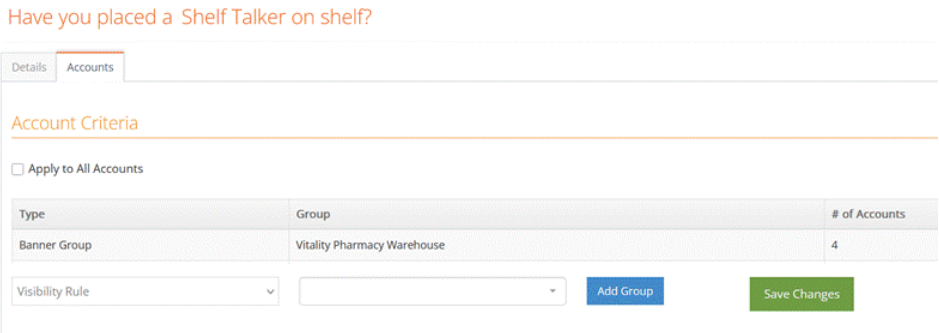
This Survey Question uses the Visibility Rule “Vitality Pharmacy Warehouse" therefore the "# Visible" is only accounts in this group
If an additional filter was applied using Report Viewer (e.g. “Banner”) then the “# Visible” is the number of accounts within the specified Banner.
- # Yes
This column will return the total number of unique accounts that have answered “Yes” to the Survey Question.
Note: This means only Survey Questions where “Yes” is an available answer will work in this report
- % Yes
This column is a calculation. The calculation is “# Yes” / “# Visible” (formatted as a percentage to 2 decimal places)