
Summary
This is a detailed report that allows a user to report on the number of calls completed on accounts.
Report Location
Report Category: Coverage
Report Sub Category: Summary
Report: TM Coverage By Account
Report Type: Report Viewer embedded
Report Sample
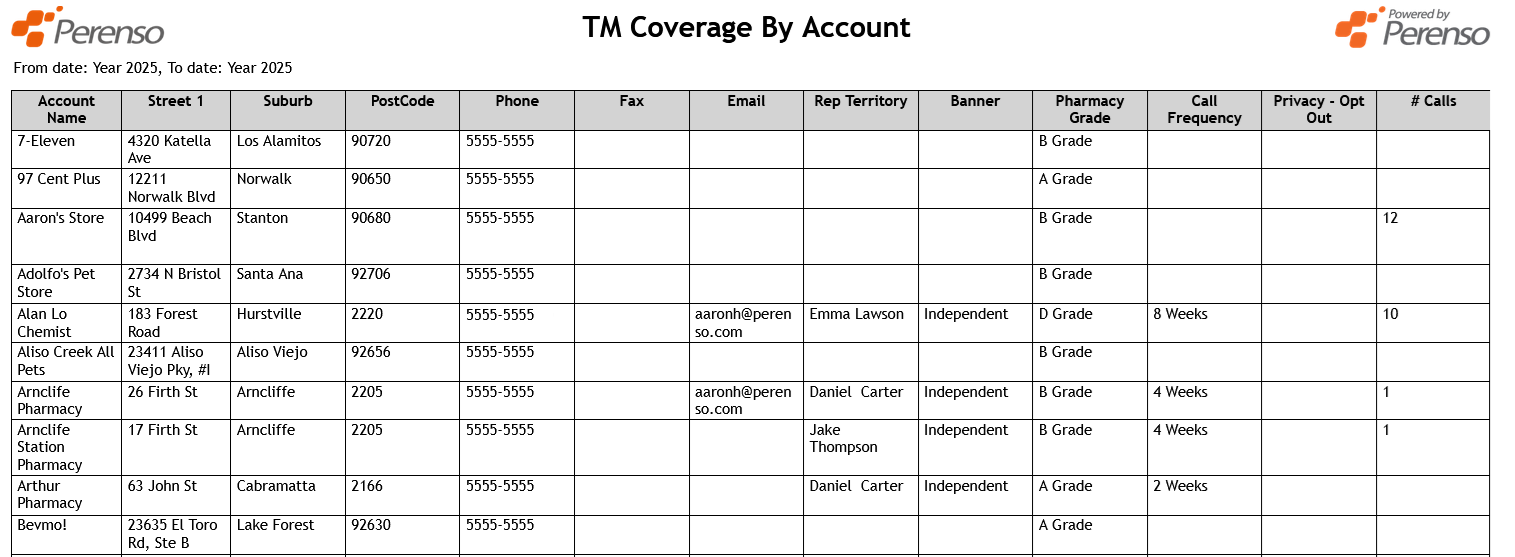
Parameters \ Filters
- Period From
Allows a user to choose a From Period (e.g. a week, month or year)
- Period To
Allows a user to choose a To Period (e.g. a week, month or year)
- Account Group 1
This filter list will return the "Group Reports On" Account Group for the account in the ‘Account Name’ column. The " Group Reports On" Account Group is defined in Administrator within "Reporting Config".
- Account Group 2
This filter list will return the "Extra Group 1" Account Group for the account in the ‘Account Name’ column. The "Extra Group 1" Account Group is defined in Administrator within "Reporting Config".
- Account Group 3
This filter list will return the "Extra Group 2" Account Group for the account in the ‘Account Name’ column. The "Extra Group 2" Account Group is defined in Administrator within "Reporting Config".
- Account Group 4
This filter list will return the "Extra Group 3" Account Group for the account in the ‘Account Name’ column. The "Extra Group 3" Account Group is defined in Administrator within "Reporting Config".
Report Notes \ Data Filters
- All accounts are returned that are visible to the user
- Only accounts that are active are returned
Sort Order
- Account Name (A-Z)
Column Definitions
- Account Name
This column returns the “Display Name” of the account
- Street 1
This column returns the Street 1 field from the "Primary Address" section of the Account
- Suburb
This column returns the Suburb field from the "Primary Address" section of the Account
- Phone
This column returns the Primary Phone Number field from the "Account Details" section of the Account
- Fax
This column returns the Primary Fax Number field from the "Account Details" section of the Account
This column returns the Primary Email field from the "Account Details" section of the Account
- Account Group 1 (e.g. Rep Territory)
This column will return the lowest level of the "Group Reports On" Account Group for the account in the ‘Account Name’ column. The " Group Reports On" Account Group is defined in Administrator within "Reporting Config"
- Account Group 2 (e.g. Banner)
This column will return the lowest level of the "Extra Group 1" Account Group for the account in the ‘Account Name’ column. The "Extra Group 1" Account Group is defined in Administrator within "Reporting Config".
- Account Group 3 (e.g. Pharmacy Grade)
This column will return the lowest level of the "Extra Group 2" Account Group for the account in the ‘Account Name’ column. The "Extra Group 2" Account Group is defined in Administrator within "Reporting Config".
- Account Group 4 (e.g. Call Frequency)
This column will return the lowest level of the "Extra Group 3" Account Group for the account in the ‘Account Name’ column. The "Extra Group 3" Account Group is defined in Administrator within "Reporting Config".
- Privacy – Opt Out
This column will return the "Privacy – Opt Out" Account Group for the account in the ‘Account Name’ column.
- # Calls
This column returns the total number of completed calls where the Call Type is set as “Count Towards Call Rate”