
The intention of this report is to allow a user to report on products sold within a selected deal. This is a summary report that allows a user to get a list of accounts as rows, and a list of products as columns. The report can be filtered to a deal so that only products in the deal show as columns.
Report Location
Report Category: Sales
Report Sub Category: Summary
Report: Deals Sales by SKU \ Account
Report Type: Export only
Report Sample
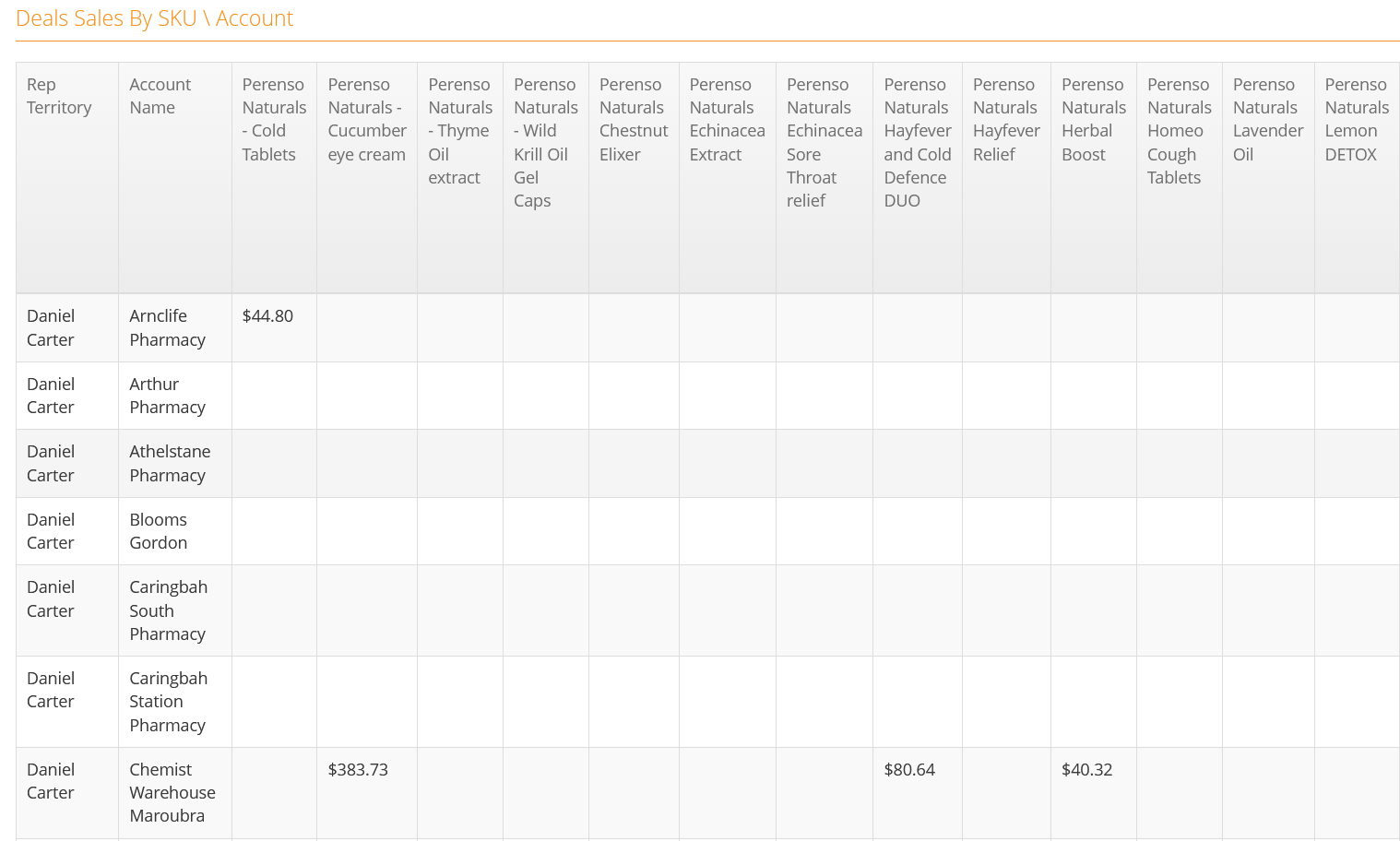
Totals & Sub-Totals
Grand Total for rows and columns of the report as per sample
Parameters \ Filters
- Deal
This will return a list of all deals in Perenso
- Period From
Allows a user to choose a From Period (e.g. a week, month or year)
- Period To
Allows a user to choose a To Period (e.g. a week, month or year)
- Based On
Allows a user to choose between Activity Date, Order Date, Delivery Date
(Activity Date is default)
- Account Group 1
This filter list will return the "Group Reports On" Account Group for the account in the ‘Account Name’ column. The " Group Reports On" Account Group is defined in Administrator within "Reporting Config".
- Account Group 2
This filter list will return the "Extra Group 1" Account Group for the account in the ‘Account Name’ column. The "Extra Group 1" Account Group is defined in Administrator within "Reporting Config".
- Account Group 3
This filter list will return the "Extra Group 2" Account Group for the account in the ‘Account Name’ column. The "Extra Group 2" Account Group is defined in Administrator within "Reporting Config".
- Account Group 4
This filter list will return the "Extra Group 3" Account Group for the account in the ‘Account Name’ column. The "Extra Group 3" Account Group is defined in Administrator within "Reporting Config"
- Value Type
This filter allows a user to set the values returned in the report with the options Unit Qty or Total NIS
Report Notes \ Data Filters
- Only orders generated from within Perenso are counted on this report
Sort Order
- Territory (A – Z), then Account Name (A-Z)
Column Definitions
- Territory
This column will return the lowest level of the "Group Reports On" Account Group for the account in the ‘Account Name’ column. The " Group Reports On" Account Group is defined in Administrator within "Reporting Config".
- Account Name
This column returns the “Display Name” of the account
- (Product Names as columns)
These columns return the Product Description. The products returned as based on the parameters defined. For example, if a specific “Deal” was defined in the parameters then a column would appear for each product in the “Deal”. If a specific “Brand” was defined in the parameters then a column would appear for each product in the “Brand”.
The value under each product is the the total number of units sold