
Deal Summary By Account
Summary
The report is designed to allow users to report on the total sales of selected deal\s by account. A multi select parameter allows a user to define one or more than one deal.
Report Location
Report Category: Sales
Report Sub Category: Summary
Report: Deals Summary By Account
Report Type: Export only
Report Sample
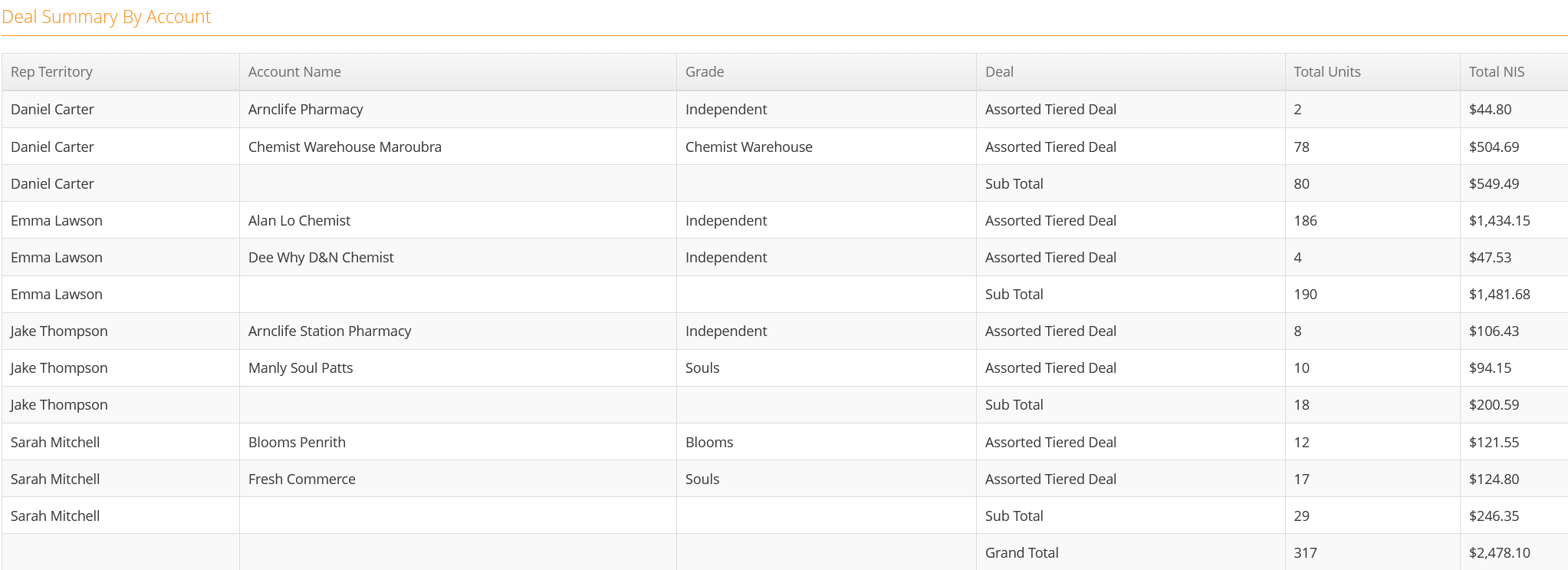
Totals & Sub-Totals
Sub Total at the Account Group level
Grand Total at the bottom of the report as per sample
Parameters \ Filters
- Deal
This is a multi select check list to allow multiple deals to be selected
- Account Group 1
This filter list will return the "Group Reports On" Account Group for the account in the ‘Account Name’ column. The "Group Reports On" Account Group is defined in Administrator within "Reporting Config".
- Account Group 2
This filter list will return the "Extra Group 1" Account Group for the account in the ‘Account Name’ column. The "Extra Group 1" Account Group is defined in Administrator within "Reporting Config".
- Account Group 3
This filter list will return the "Extra Group 2" Account Group for the account in the ‘Account Name’ column. The "Extra Group 2" Account Group is defined in Administrator within "Reporting Config".
- Account Group 4
This filter list will return the "Extra Group 3" Account Group for the account in the ‘Account Name’ column. The "Extra Group 3" Account Group is defined in Administrator within "Reporting Config".
Report Notes \ Data Filters
- Only orders generated from within Perenso are counted on this report as external data does not contain deal information
- Only accounts with a value in the “Total Units” and \ or “Total NIS” columns are returned
Column Definitions
- Territory
This column will return the lowest level of the "Group Reports On" Account Group for the account in the ‘Account Name’ column. The " Group Reports On" Account Group is defined in Administrator within "Reporting Config".
- Account Name
This column returns the “Display Name” of the account
- Grade
This column will return the lowest level of the "Extra Group 1" Account Group for the account in the ‘Account Name’ column. The "Extra Group 1" Account Group is defined in Administrator within "Reporting Config".
- Deal
This column returns the “Description” of the deal\s selected in the parameters of the report
- Total Units
This is the total number of units sold for all order lines that have attracted the selected deal\s
If the account had ordered the same product multiple across multiple orders for the same deal and had received the same discount, this column is the sum of all orders for the account \ product for that discount
- Total NIS
This is the total NIS Value sold for all order lines that have attracted the selected deal\s